


DHI Orbit is free and open source. If it saves you time, please support its development:



DHI Orbit
One local board for every coding-agent chat on your machine: Claude Code, Codex, Cursor, Gemini CLI and Antigravity, and any other terminal agent you describe in a small agents.json.
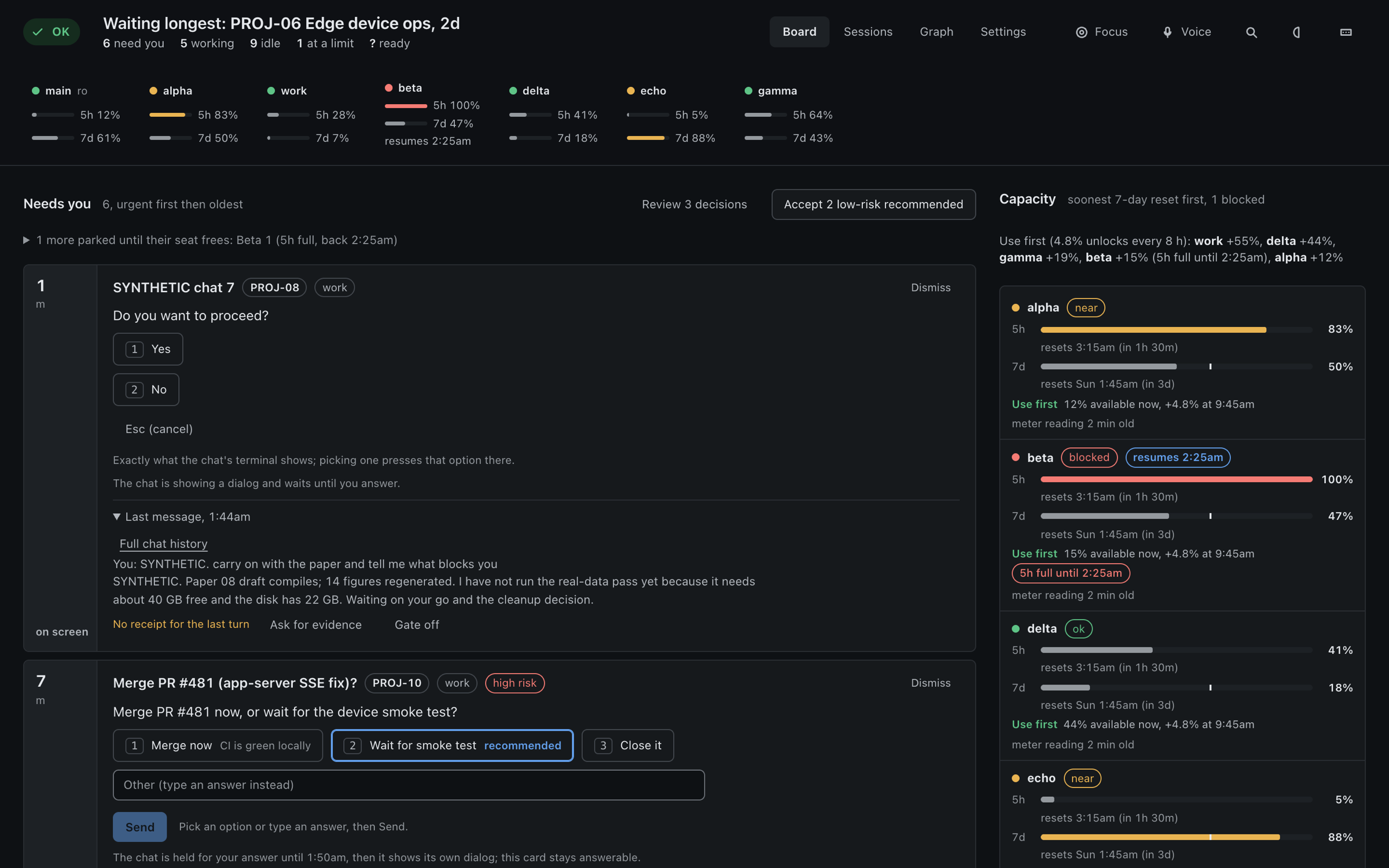
- A board of what needs you: questions, permission prompts, blocked jobs, and chats stalled on a usage limit.
- Every agent's chats in the same lists, labelled with the tool's name (see Other agents on the same board).
- Reply to a chat from the page (one normal turn in that chat), stop it, or open it in Terminal. Background chats take replies too.
- Usage limits (5-hour and 7-day) per Claude Code account, and for Codex; set up when you connect the account, never a guess.
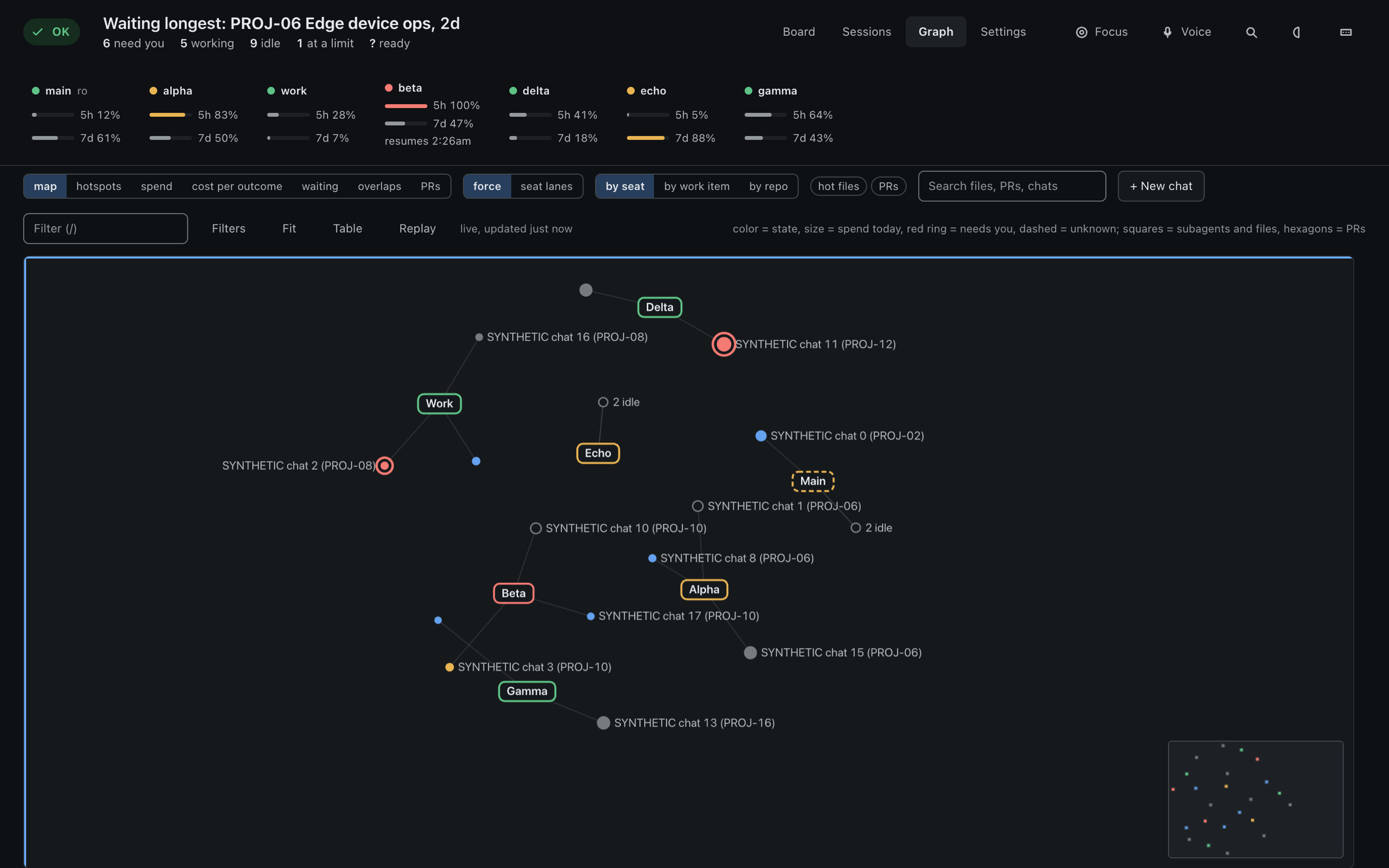
- A graph of accounts, chats, work items and the files they touch.
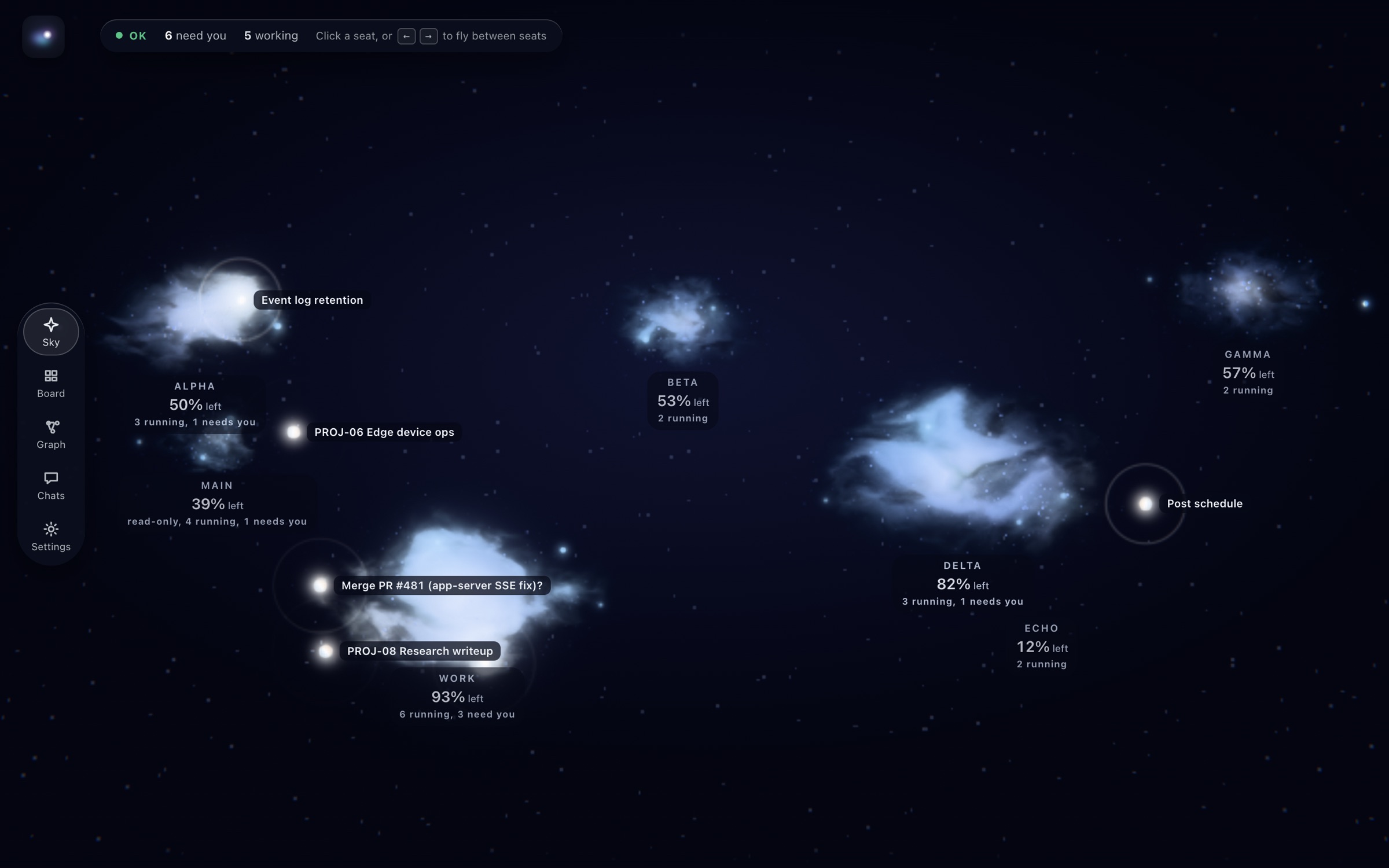
- Optional WebGL "nebula" look (Settings, Look). The default look is plain and needs no GPU. Settings > Quality scales it for weaker machines.
- Standard library only: no dependencies, no build step, no CDN. Runs on macOS, Linux and Windows (beta).
Viewing costs zero model tokens: DHI Orbit only reads files. A reply you send is one normal turn in that chat.
Screenshots
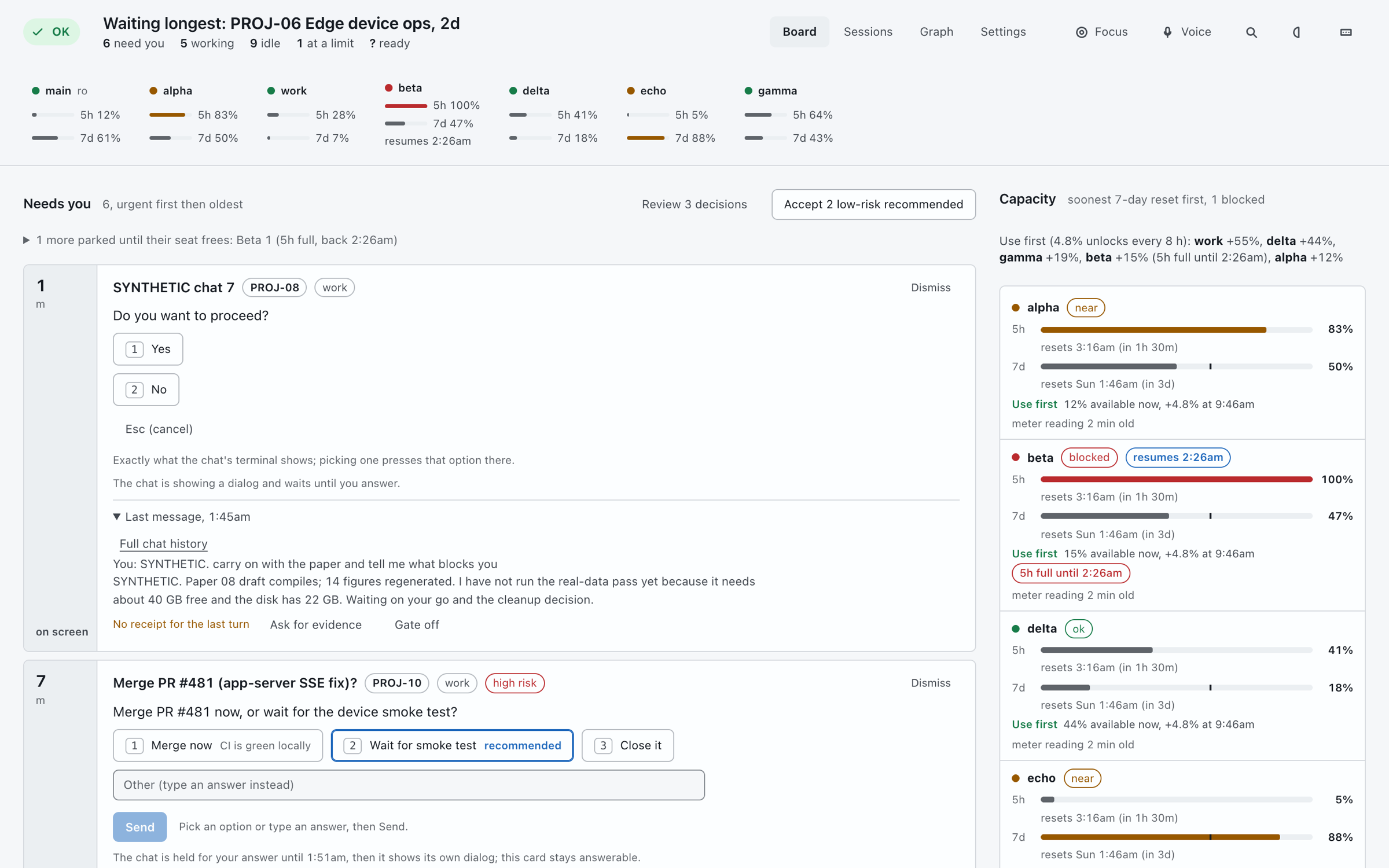
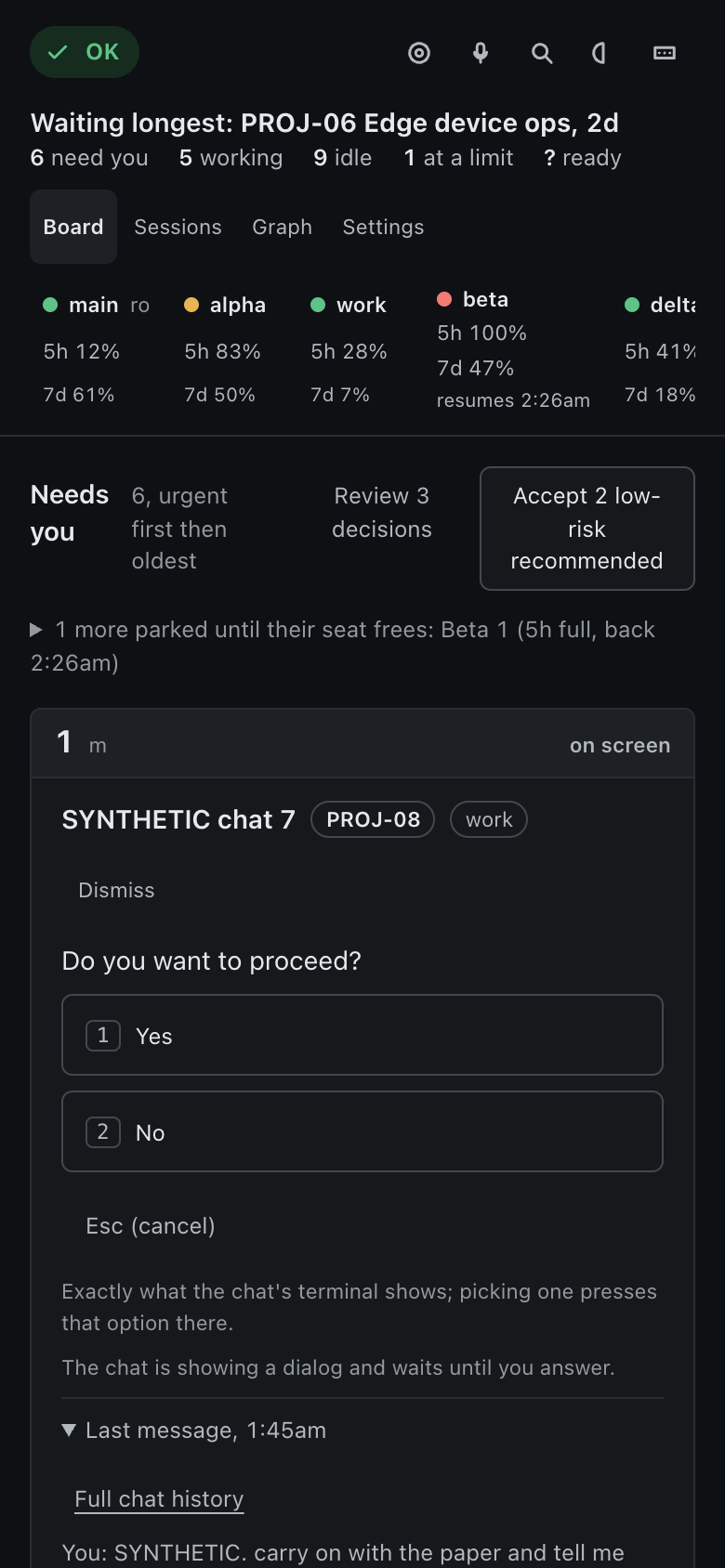
Synthetic demo data (no real chats): the board with one question and the per-account limits, the graph, the optional nebula look, the light theme, and the phone layout.
Install
Requires Python 3.10 or newer.
Homebrew (macOS or Linux):
brew install Dv04/dhi-orbit/dhi-orbit
pipx:
pipx install dhi-orbit
pip, in any virtualenv:
python3 -m pip install dhi-orbit
You also need at least one of the agents it reads: Claude Code itself (claude on your PATH) for the Claude Code features, or Codex, Cursor, Gemini CLI or Antigravity (see Other agents on the same board).
Windows: pipx install dhi-orbit (or pip) pulls in pywinpty (ConPTY, used to type into claude attach and to run
sign-in) and tzdata by itself. Use Windows 10 version 1809 or newer for ConPTY. Git for Windows is not needed. The board,
replies, answering questions, sign-in, keep-warm (the PC is kept awake) and the status-line meter are ported; the Schedules
panel (launchd and cron) is macOS and Linux only and stays empty on Windows, and desktop notifications are a tray balloon.
Notes from Claude Code's documentation: install Claude Code natively (irm https://claude.ai/install.ps1 | iex); if you
installed it with npm, run claude install once, because a .cmd launcher cannot pass new lines or quotes in a reply. A chat
open in a terminal cannot be typed into from here (on any system): type /bg in that terminal and it becomes a background chat
you can answer here. Only chats touched in the last 24 hours are listed: start with dhi-orbit --window-hours 168 for a week.
Where Claude Code does not keep its sessions/ folder, running chats are read with claude agents --json.
Windows support is beta: as of 0.3.11 it passed its 14 end-to-end checks and the full test suite on a Windows 11 ARM64 virtual machine (real ConPTY, real claude.exe, with and without Git for Windows), but has not been run on every kind of PC yet. Please report anything odd (Settings > Report a bug or send feedback).
Quick start
dhi-orbit
orbit is a shorter name for the same command. Then open http://127.0.0.1:8787/. dhi-orbit --help lists the options (--port, --window-hours, --every, --no-notify). macOS notifications for chats that need you are on by default; --no-notify turns them off.
On first run DHI Orbit creates its data directory, ~/.config/dhi-orbit (or $DHI_ORBIT_HOME), with mode 700, and an
access token inside it (.token, mode 600). The page gets the token injected when it is served from loopback.
Upgrading from chatdash
DHI Orbit is the new name of chatdash. The chatdash command still works (as do chatdash-ask-hook,
chatdash-stop-hook and chatdash-statusline), an existing ~/.config/chatdash data directory (with its
chatdash.db) keeps being used, and the CHATDASH_* environment variables are still read; the DHI_ORBIT_*
name wins when both are set. A status line meter or hook that chatdash installed keeps running (a small
chatdash module forwards to DHI Orbit) and the meter is rewritten to the new command the next time you turn
usage on for that account. While the old data directory is in use, the Schedules panel keeps managing your
com.chatdash.* launchd jobs; new installs use com.dhi.orbit. Python imports are now dhi_orbit.
Connect your accounts
Open Settings > Accounts (a fresh install opens on that screen). Type a name, for example work, and press
Connect account. DHI Orbit creates ~/.claude-work and runs Claude Code's own claude auth login for it:
a claude.com sign-in page opens in this computer's browser, you approve, and the account shows as signed in.
From another device (the page on your phone, say), open the sign-in link shown there instead, approve, and paste
the code claude.com shows; it is typed into Claude Code's own prompt.
DHI Orbit never sees, stores or sends your password or tokens: Claude Code writes its credentials into that
account's folder exactly as when you sign in in a terminal. Accounts you already use (~/.claude, any
~/.claude-<name>) appear by themselves.
- Disconnect hides an account from the board; its sign-in and chats are untouched. Reconnect shows it again.
- Delete signs the account out (
claude auth logout) and moves its folder to the Trash. It needs you to type the account name, and refuses while a chat on it is running.~/.claude(your default) is only signed out and hidden, never moved.
Use an account in a terminal with CLAUDE_CONFIG_DIR=~/.claude-work claude, or start chats from the board.
Only connect accounts that are yours; Anthropic's terms do not allow sharing logins.
Multi-account
DHI Orbit looks for config directories in your home folder: ~/.claude and any ~/.claude-<name> that contains
both projects/ and sessions/. Each one is an account ("seat" in the UI): ~/.claude is called main,
~/.claude-work is called work. Replies, stop and new chats run through the unmodified claude binary with that
account's CLAUDE_CONFIG_DIR.
Labels come from the directory name (work is shown as "Work"). Override them, and mark accounts as read-only
(shown, never acted on), in config.json in the data directory. Copy config.example.json to start.
| Key | Default | Meaning |
|---|---|---|
seat_labels |
{} |
account name to display label |
read_only_accounts |
[] |
accounts that are shown but never replied to, stopped, spawned on or hooked |
work_item_pattern |
"" |
regex; a chat whose name matches it belongs to that work item (for example PROJ-\d+). Empty: no work items, chats group by account and folder |
evidence_gate_work_items |
[] |
work items whose chats get the evidence gate on by default |
default_cwd |
your home folder | folder for chats started from the page |
launchd_prefix |
com.dhi.orbit |
label prefix of the launchd jobs the Schedules panel manages |
timezone |
this computer's | IANA name used to show clock times |
meter_log |
<data dir>/meter.log |
where usage readings come from (below) |
public_url |
"" |
host name of a tunnel you set up yourself (below) |
hidden_accounts |
[] |
accounts disconnected in Settings > Accounts (not shown on the board) |
plugins |
{} |
optional helper modules, for example {"usage_live": {"path": "/dir", "module": "usage_live"}} |
The binary is found from $CLAUDE_BIN, then PATH, then ~/.local/bin/claude.
Usage limits
DHI Orbit does not call any usage endpoint. Claude Code hands its status line command each account's limits
(rate_limits: five_hour and seven_day, with used_percentage and resets_at), for every chat, background ones
included. DHI Orbit records them with a status line of its own:
- Connecting an account in Settings > Accounts turns it on when the account has no status line yet.
- Any other account has a Show usage button there. If the account already has a status line, DHI Orbit keeps
it: its own command runs first to record the limits, then yours runs with the same input and its output is what
your terminal shows. Turn off, Disconnect, or signing out
mainput your status line back exactly. A status line you changed yourself afterwards is never touched. - Claude Code only runs the status line while a chat is open, so a new account shows "waiting for the first chat" until it has run one. With the meter off, the board says "usage not connected" instead.
The setting is the account's settings.json statusLine (your previous one is kept in dhi-orbit-statusline.json
beside it). The readings go to a meter log, one tab-separated line per change: ISO time, config dir,
session id, rate_limits JSON. dhi-orbit-statusline is the same command, if you prefer to call it from a status
line script of your own, and contrib/statusline-meter.py is a standalone copy that only records.
A reading whose reset time has passed shows "?" and "reset since the last reading", never 0%. An optional
usage_live plugin module (fetch_live(account_dir_name) returning {"five": pct, "seven": pct}) can supply a
fallback reading; without it nothing is fetched.
Automatic actions
Everything that sends text into a chat on its own has a mode, off, dry-run or on, set in config.json
(or on the Settings page). The default is dry-run: it logs what it would do and sends nothing. The modes are
limit_resume, decision_hook, stop_gate, shadow_drafts, corrections, handoff and idle_compact.
Automatic keep-warm (a tiny ping before a chat's prompt cache expires) is off until you switch it on in the toolbar.
Permission prompts are never answered automatically.
Two optional Claude Code hooks feed the board. They are not installed for you; register them yourself in the Claude Code configuration of each account you want covered:
dhi-orbit-ask-hook, aPreToolUsehook with matcherAskUserQuestion: puts a background chat's question on the board.dhi-orbit-stop-hook, aStophook: records a receipt (files changed, checks run) for each turn and, when the evidence gate is on, asks the chat for verification evidence before it ends. At most 3 blocks per turn.
Both fail open: any error, a read-only account, or a non-background session prints nothing and the chat carries on.
Other agents on the same board
Every local terminal agent you use can sit in the same lists as your Claude Code chats (Board, Sessions, Graph, search, the chat view), labelled with its name. Four are built in and appear by themselves when their files exist:
| Agent | Read from | Reply runs | Checked against |
|---|---|---|---|
| Codex | ~/.codex |
codex exec resume |
Codex 0.160 and real chats; its 5 h and 7 d limits are shown as a gauge |
| Cursor | ~/.cursor/chats |
cursor-agent --resume |
Cursor 2026.09 (reading verified; a reply was refused by Cursor's own usage limit) |
| Gemini CLI | ~/.gemini/tmp/*/chats/session-*.jsonl (or $GEMINI_CLI_HOME) |
gemini --resume <id> -p in the chat's project folder |
Gemini CLI 0.63.0: its own source (file names, record schema and the replay of rewinds, patches and reorders) and a real 0.63.0 install (project registry and folders). It keeps no quota on disk, so limits read as unknown |
| Antigravity | ~/.gemini/antigravity*/conversation_summaries.db (list, titles, folders, running or killed) and the brain/*/.system_generated/logs/transcript*.jsonl text |
agy -p <text> --conversation <id> |
agy 1.3.1: a real install (flags, folders, the database schema). The conversation files themselves (conversations/*) are not read; the transcript line format is taken from published captures |
A reply you type reaches the same thread and runs detached, so a long turn does not hold the page; it is refused while the agent's turn
is still running. Limit resume, idle compaction, keep-warm and handoff only ever drive Claude Code and never act on these chats.
Turn a built-in off with "providers_off": ["cursor"] in config.json.
Any other terminal agent: agents.json
Put a file agents.json in the data folder (next to config.json) describing the agent. No code, no restart of your agent.
{"agents": [
  {"id": "myagent", "label": "My agent",
   "files": {"glob": "~/.myagent/sessions/*.jsonl", "format": "jsonl", "role": "role", "text": "content", "time": "ts", "cwd": "cwd"},
   "reply": ["myagent", "--resume", "{id}", "-p", "{text}"],
   "terminal": ["myagent", "--resume", "{id}"]},

  {"id": "bridge", "label": "Bridge",
   "list": ["python3", "~/bin/bridge.py", "list"],
   "turns": ["python3", "~/bin/bridge.py", "turns", "{id}"],
   "reply": ["python3", "~/bin/bridge.py", "send", "{id}", "{text}"]}
]}
- By files (the agent keeps one file per chat):
glob(a string or a list),format(jsonl= one message per line, orjson= a list, or an object holding one undermessages), and the field names forrole,textand optionallytimeandcwd(dotted paths such asmessage.contentwork). Rolesuser/humanandassistant/model/aiare understood; adduser_rolesorassistant_rolesfor others. A text field may be a string or a list of parts withtext. - By script:
listprints a JSON list of{id, title, cwd, updated_at, state, last_prompt, final, model};turnsprints[{role, text, at}]for one chat ({id}and{limit}are filled in). Any language: the script does the reading, so SQLite or anything else an agent uses fits. replyis a command, not shell text: each item is passed as is,{id},{text}and{cwd}are replaced inside an item, and the text is always one argument, so quotes,&&and$(...)in a message do nothing. Withoutreplythe agent is read-only.- A mistake in the file never stops the board: it shows as a health note ("agents.json: ...") and the other entries still load.
The ids
claude,codex,cursor,gemini,antigravityandmainare taken.
How a reply is delivered
| Chat | Route |
|---|---|
| background session, idle or stopped | typed into claude attach <id> through a pty, confirmed by reading the prompt back from the transcript |
| open in a terminal tab | refused: Return does not submit through a paste into Claude's input box, and two writers corrupt a session |
| closed chat with no background job | claude --resume <id> --bg "<text>" (a copy under a new id; the first reply re-caches the context once) |
| working right now | refused until idle, or queued and sent when it goes idle |
Use it on your phone
DHI Orbit listens only on 127.0.0.1 on the computer that runs it, so a phone cannot reach it directly, and there is no hosted version.
To use it from a phone you put a tunnel of your own in front of it and sign in once with a key. The steps below use a Cloudflare Tunnel;
any tunnel that forwards a host name to http://127.0.0.1:8787 works the same way on Orbit's side.
You need a domain on Cloudflare (the free plan is enough), cloudflared installed on the computer that runs Orbit, and Orbit running.
- Create the tunnel and point a host name at it (once):
sh
   cloudflared tunnel login
   cloudflared tunnel create orbit
   cloudflared tunnel route dns orbit orbit.example.com
- Forward that host name to Orbit in
~/.cloudflared/config.yml:
yaml
   tunnel: <the id printed by "tunnel create">
   credentials-file: /home/you/.cloudflared/<the id>.json
   ingress:
     - hostname: orbit.example.com
       service: http://127.0.0.1:8787
     - service: http_status:404
- Tell Orbit that host name is allowed and that a key may sign you in. Create
public.jsonin the data directory (~/.config/dhi-orbit, or$DHI_ORBIT_HOME):
json
   {"host": "orbit.example.com", "key_login": true}
Orbit reads this file on every request, so no restart is needed. Any other host name is refused.
- Start the tunnel, and keep it running (as a service, so it survives a reboot; see Cloudflare's
cloudflared service install):
sh
   cloudflared tunnel run orbit
-
On the phone, open
https://orbit.example.com. It asks for the access key: the contents of the file.tokenin the data directory (cat ~/.config/dhi-orbit/.tokenon the computer). Or openhttps://orbit.example.com/#k=<the key>and it signs in by itself; the part after#is never sent to the server and the page removes it from the address bar. The sign-in sets a cookie for 30 days (Secure, HttpOnly, this device only). After that the dashboard opens directly. -
Optional: add it to the home screen (iPhone: Share, Add to Home Screen; Android: the browser menu, Add to Home screen) to open it full screen.
On a phone the dashboard shows one screen at a time: the Sessions list, and a chat when you tap one (the Sessions link in the chat goes back). You can answer a question or approve a tool call from the chat screen, and the Attach button opens the phone's file picker to send a screenshot or document with your reply.
Keep the key private. Anyone who has the host name and the key can read and reply to your chats and run the actions on the board.
Wrong keys are limited to 10 per hour per address. To change the key, delete .token in the data directory and restart Orbit;
every device then signs in again with the new one.
For a team, or if you would rather not use a key, Cloudflare Access can sign people in instead: in public.json give
team_domain (your <team>.cloudflareaccess.com name) and emails (the addresses allowed in) in place of key_login.
With a host and neither sign-in method configured, Orbit stays locked.
Security model
- The server binds to 127.0.0.1 only. The
Hostheader is checked (no DNS rebinding). - Every
/apicall needs the token from<data dir>/.token(headerX-Tokenor?token=). The token file is created with mode 600 in a mode 700 directory. - Sends go only through the unmodified
claudebinary under each account. DHI Orbit makes no network calls of its own, exceptgh pr view(ifghis installed) to show whether a PR is still open, and, only if you configure the identity-header check below, one request to that identity endpoint. - Reaching it from other devices is your choice and your setup: put a tunnel of your own in front of the loopback port
and describe it in
<data dir>/public.json(host, and either"key_login": truefor a one-time key sign-in that sets a 30-day cookie, orteam_domainplusemailsfor an identity-header check). With nopublic.jsonand nopublic_url, any otherHostis refused. With a host but no sign-in method configured, it stays locked.
Compatibility
DHI Orbit reads undocumented Claude Code internals. These are not a stable interface and may change in any Claude Code update, which can break parts of DHI Orbit:
<config dir>/sessions/<pid>.json(live session records) and<config dir>/jobs/<id>/state.json(background jobs),- the transcripts,
<config dir>/projects/*/*.jsonl, - the screen output of
claude attachandclaude logs, parsed to read and answer permission prompts and questions.
If something looks wrong after a Claude Code update, the board may be showing stale or missing data; limits and health show UNKNOWN rather than OK when a source cannot be read.
Suggested environments
These are the versions run before each release. Use them for the smoothest experience.
| System | Version we run | Checked with |
|---|---|---|
| macOS | 27.0 (Apple Silicon), Python 3.12 and 3.14 | the full test suite, daily use |
| Windows | 11 build 26100 (ARM64 virtual machine, x64 Python 3.12), with and without Git for Windows | the 14 end-to-end checks (real ConPTY, real claude.exe) and the full test suite: 271 passed, 10 skipped (POSIX-only tests) |
| Linux | Ubuntu 22.04.5 LTS (x86_64, kernel 6.8), Python 3.10.12 | the full test suite (324 passed) and dhi-orbit --help from a fresh virtual environment; no live Claude Code session was run there |
Gemini CLI, Antigravity (agy) |
0.63.0, 1.3.1 | the readers against the tools' own source and a real agy 1.3.1 conversation (list, transcript, reply) on macOS; not run on Windows or Linux with a real install, and Gemini CLI not run with a signed-in chat |
| Claude Code | 2.1.292 | claude agents --json, claude --version, the board and replies up to the sign-in step |
Python 3.10 or newer is required. The suite on Windows was last run before the Gemini, Antigravity and agents.json readers were added; for those, Windows behaviour (paths, file:///C:/ folders, .cmd shims) is checked against the tools' documentation and by tests, not by a Windows run.
Older or other versions (macOS before 27, Windows 10 or earlier, other Linux distributions, other Python or Claude Code versions) may well work, but they are best effort: they are not supported, and a problem that only happens there is not investigated or fixed. Reports from the suggested environments come first.
macOS-only parts: notifications use osascript there (a tray balloon on Windows, notify-send on Linux), opening a chat in a
terminal works on macOS and Windows, and the Schedules panel uses launchctl.
DHI Orbit is developed on macOS; a clean pipx install on Linux was tested end to end (accounts, sign-in, board, nebula).
Quality settings
Settings > Quality scales how much the background, Sky and Graph draw, per browser: frame rate limit, render resolution, nebula detail, particles, glow, glass blur, and switches for the animated background and interface animations. Presets Low, Balanced (the default, identical to before), High and Ultra set them all at once. Turn them up on a strong GPU, down on a modest laptop or battery.
Development
python3 -m pytest -q
tools/mock/server.py serves the UI with synthetic data (no real chats are read); tools/acceptance/ holds the UI
checks. docs/DESIGN.md records the visual design.
Report a bug or send feedback
Settings > Report a bug or send feedback opens a new issue on https://github.com/Dv04/dhi-orbit/issues with your text filled in (Bug or Feedback, optionally with the DHI Orbit version and browser). Nothing is sent from the dashboard: you review the issue on GitHub and submit it yourself.
Support and questions
Questions and ideas: GitHub Discussions. Bugs: Issues.
DHI Orbit is free and stays free (MIT). You can support its maintenance through GitHub Sponsors, PayPal or Venmo.
About
Built by Dev Sanghvi at DHI (https://dhi-tech.com).
License
MIT, see LICENSE.